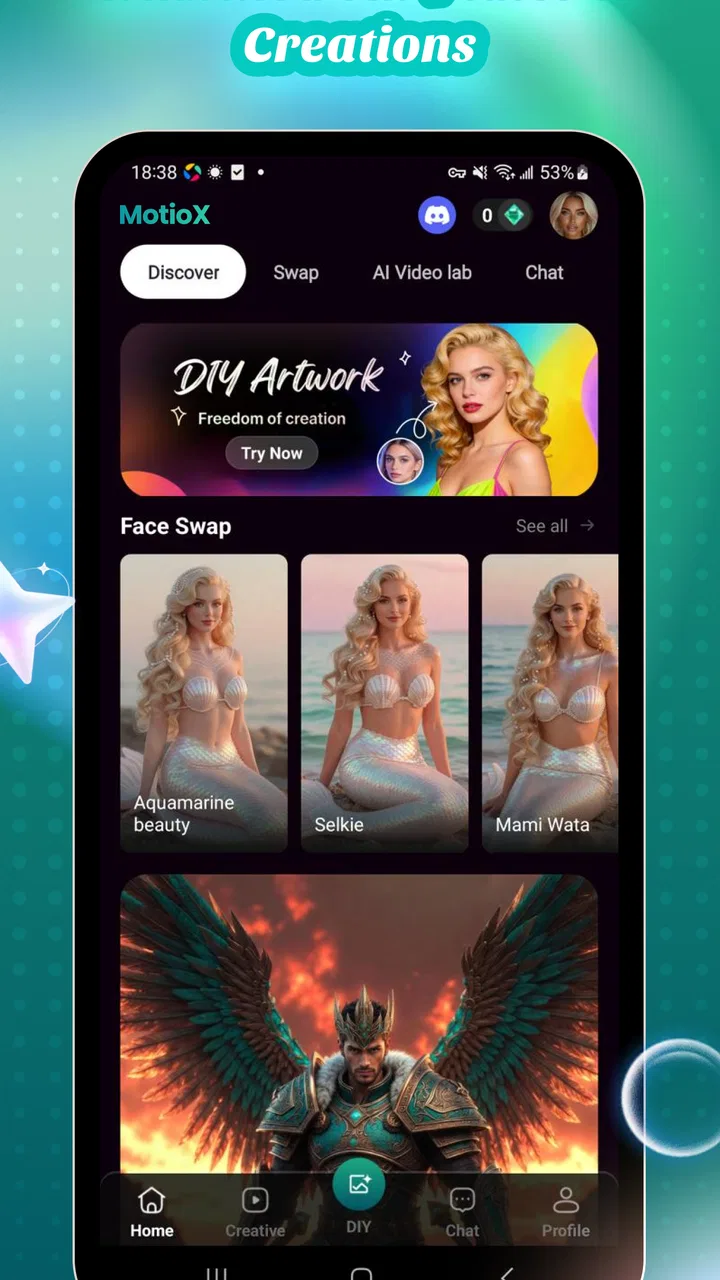
MotioX: AI Video, Art & Chat
- 1.0
- Rating
- 50.00K
- Installs
- Free
- Price

 Analysis by App-foxy
I opened MotioX: AI Video, Art & Chat expecting a quick way to turn a rough idea into something visual, and that is the right mindset for this app. It sits in the Art & Design category, comes from HalooshApp, and is aimed at people who want creative assistance without starting in a full editing suite. The central appeal is the combination of AI video creation, artistic styling, and chat-based interaction in one place.
My experience was less about replacing a professional editor and more about shortening the distance between “I have an idea” and “I have something I can react to.” That distinction matters. MotioX is useful when the first draft is the hardest part, but it is not automatically the best choice when you need exact control, predictable output, or a polished production pipeline.
From a rough idea to a visual starting point
The most realistic starting condition is a small creative task: a short concept for social media, a mood piece, an artistic experiment, or a visual prompt that is difficult to explain in traditional editing software. I found the chat element especially relevant here because it lets the creative process begin in ordinary language rather than with a timeline, layers, keyframes, and export settings.
You May Also Like

 Pandora - Music & Podcasts
Pandora’s Music Is Easy to Start, but Harder to Recover
Pandora’s strength is its low-effort path from a seed to a station. Its weak spot is how much confidence it asks you to place in connection, setup, and quiet recovery.

 AccuWeather: Weather Radar
AccuWeather Review: A Quick, Clear Forecast for Everyday Decisions
For everyday plans, the best forecast is the one you can understand quickly. AccuWeather makes rain timing, radar, and local conditions easy to act on, with a few trade-offs.

 Hill Climb Racing
Why Hill Climb Racing Still Turns Crashes Into One More Run
A tiny car, a bumpy hill and one more upgrade: Hill Climb Racing keeps resurfacing because its simple chaos makes every near-miss feel personal.

 AliExpress - Shopping App
AliExpress Makes Global Shopping Feel Personal, but Shoppers Bear the Risk
AliExpress turns a global marketplace into a pocket-sized discovery engine. Its reach is useful, its shopping loop compelling, and its trade-offs easy to miss.

 Lords Mobile: Kingdom Wars
Lords Mobile Is a Kingdom-Building Routine, Not a Quick Match
A case-by-case verdict on the building, battles, device demands, and social commitments that make Lords Mobile rewarding for some players and exhausting for others.

 PDF Scanner app - TapScanner
TapScanner Makes Paperwork Easier to Capture, Check, and Share
TapScanner makes scanning with a phone feel less like a rescue operation and more like a dependable step in getting work done. Its capture tools are useful, though not flawless.
More From Our News Desk
View All News


That makes the app approachable for someone who has never used a serious video editor. Instead of first collecting assets and learning a complicated interface, I could begin by describing the atmosphere, subject, or visual direction I wanted. The benefit is not simply convenience. It changes the order of work: I can explore an idea before investing time in finding footage or building a composition manually.
At the same time, I would not treat the first generated result as a finished piece. AI-assisted creation is most valuable when it gives me a direction to refine. If I need a video to match a brand guide, a precise storyboard, or a carefully timed sequence, I would still prefer a conventional editor after the concept stage. MotioX is better understood as an idea accelerator than as a complete replacement for every part of a production workflow.
The app is free to install, which makes experimentation easier, although in-app purchases range from $5.99 to $259.99 per item. I would therefore explore the basic experience first and decide whether the workflow genuinely saves me time before spending money. The broad price range is important because a casual user and a frequent creator may reach very different conclusions about value.
How I would prepare the input
I get better results from a compact brief than from a long, unfocused paragraph. I would describe the main subject first, then the mood, visual treatment, movement, and intended audience. For example, instead of asking for “a cool video,” I would specify a quiet evening street, soft illustrated textures, slow movement, and a reflective mood. This gives the creative system a clearer target while leaving room for interpretation.
A useful habit is to separate what must remain consistent from what can change. The subject and emotional tone may be essential, while the exact color treatment or artistic finish can be explored. That approach turns the first attempt into a comparison exercise rather than a pass-or-fail test. I can ask for a different aesthetic without abandoning the underlying idea.
This is one of the less obvious strengths of a combined chat and art workflow: the conversation can act as a planning layer. I do not have to jump immediately into visual generation. I can first clarify the concept, identify the strongest image, and then move toward a video-oriented result. For people who usually stare at a blank canvas, that small planning step can be more valuable than a large collection of effects.
Moving from conversation to visual creation
The handoff from chat to image or video creation is where MotioX’s design makes the most sense. A conversation produces an idea, and the creative tools give that idea a visible form. In my preferred workflow, I would use the chat to narrow the concept, try an artistic direction, and then judge the result with practical questions: Does the subject read clearly? Is the mood consistent? Would this work as a short post, a personal project, or only as an experiment?
That last question prevents a common mistake. An attractive AI image is not automatically a useful video asset. A visual can look impressive in isolation but fail when it needs to carry a message, leave room for text, or fit into a sequence. I would evaluate each result in context, especially if I planned to hand it off to another app for editing.
The artistic side is most helpful when I want to test several directions quickly. A realistic treatment, a stylized interpretation, and a more abstract version can communicate different ideas even when they begin with the same prompt. This is a practical way to discover a visual identity before committing to a manual design process.
The handoff into an everyday project
Imagine I am preparing a short announcement for a community event. I have the event name, a simple message, and a rough idea of the mood, but no suitable footage. I could use MotioX to develop an atmospheric visual concept, create an artistic background, and use the chat interaction to refine the tone. The resulting material would then become a starting asset for a separate editing step, where I add the exact wording, timing, and final layout.
In that scenario, the app saves time at the exploration stage. I am not asking it to handle every production responsibility. I am asking it to help me move from an empty project to a visual direction that I can actually work with. That is a realistic use case for students, small creators, hobbyists, and anyone preparing informal content without access to original footage.
The same workflow could suit a personal travel montage, a visual invitation, a mood board, or a concept for a short story. The common thread is that the desired outcome begins with an idea rather than a folder full of carefully organized media. If I already have all the footage and know exactly how the final edit should look, the advantage becomes much smaller.
What happens after the first result
Once I have a result, I would resist endlessly regenerating it without a clear reason. A better process is to identify one problem at a time. If the subject is unclear, I would simplify the prompt. If the mood is wrong, I would adjust the emotional language. If the visual style is too busy, I would ask for a cleaner direction. This makes the iteration understandable and helps me learn which changes actually affect the outcome.
This is also where the chat component can be more useful than a collection of isolated buttons. A conversational interface gives me a place to explain what feels wrong in ordinary terms. That does not guarantee perfect correction, but it is less intimidating than translating every creative concern into technical settings.
I would keep a short record of prompts that produce promising results. That is a practical tip for anyone using the app repeatedly: save the wording that establishes the right subject and atmosphere, then alter only one or two elements in the next attempt. Without that discipline, it is easy to lose track of why one version worked better than another.
Where MotioX fits beside familiar alternatives
Compared with a traditional mobile video editor, MotioX is more appealing at the beginning of the process. Conventional editors are stronger when I need accurate cuts, detailed audio placement, text animation, transitions, and repeatable layouts. They assume I already have material and a plan. MotioX is more useful when the material or plan is still forming.
Compared with a dedicated illustration app, its conversational approach may feel faster for exploring styles, but it is unlikely to offer the same hands-on precision as drawing, masking, brush control, or layer-based work. An illustrator who wants to control every mark may find the AI route frustrating rather than liberating.
Compared with a standalone chatbot, the visual creation focus gives MotioX a clearer practical destination. The conversation is not only for answering questions; it supports an artistic outcome. However, users who mainly want research, writing, scheduling, or general assistance would be better served by an app designed around those tasks.
The important trade-off is control versus momentum. MotioX favors momentum. It helps me reach a visual draft quickly, while established creative software gives me more predictable control once the project becomes specific. I would use both types of tools together rather than expecting one app to excel at every handoff.
Who should try it, and who should skip it
I think MotioX is a good fit for curious beginners, social creators who need ideas, students exploring visual communication, and hobbyists who want to experiment with AI-assisted art. It is also suitable for someone who regularly knows the feeling they want but struggles to turn that feeling into a first visual concept.
I would be more cautious if I were a professional editor working under strict delivery requirements. A client project may demand consistent characters, exact framing, controlled typography, reliable revisions, and a clearly repeatable process. In that environment, the convenience of a fast creative draft may not compensate for the extra checking and rebuilding required afterward.
I would also skip it if my main goal were detailed manual illustration or advanced post-production. The app’s appeal is the bridge between language and visual experimentation, not the promise of replacing a complete desktop-style creative workstation.
Practical friction before committing
The overall rating is a 1.0 average from around 82 ratings, with five written reviews, so I would approach the app with realistic expectations rather than assuming that its concept guarantees a smooth experience for everyone. Its install base is over 50 thousand, which shows that people are trying it, but popularity alone does not settle whether it matches my particular workflow.
The age rating is Everyone, making the app broadly approachable from a content-rating perspective. It runs on Android version 7.0 or later, and the current version is 1.1.2. Those details make it accessible to many older devices, although creative generation can still feel more demanding than ordinary note-taking or messaging, so I would pay attention to how comfortably my phone handles the process.
I would also keep the purchase model in mind before building a regular habit around it. Free access lowers the barrier to testing, but the available purchase range means that frequent use can become a meaningful expense. My advice is simple: first test whether the app produces material I would genuinely reuse, not merely results that are amusing for a few minutes.
The result I would expect
When the workflow succeeds, the result is not just a generated clip or artwork. The real outcome is a clearer creative direction. I can move from a vague thought to a concrete visual, compare styles, and decide whether the idea deserves a longer production process. That is valuable because many personal projects fail before editing even begins; the creator never finds a workable starting point.
MotioX can reduce that initial resistance. It gives me a way to test a concept quickly, then either continue refining it or discard it without having spent an afternoon building the wrong thing manually. For casual projects, that flexibility is more important than professional-level control.
My strongest recommendation is to treat every generated result as a draft with a job to do. It might establish mood, suggest composition, provide a background, or help explain an idea to someone else. Once I know that job, I can judge the result fairly. If I expect a finished campaign asset from the first attempt, disappointment is likely.
Where the workflow breaks
The process breaks when the handoff requires precision that the app is not designed to provide. A generated visual may need cleanup, resizing, exact text placement, or careful sequencing in another tool. That is not necessarily a flaw, but it means the app belongs to a larger workflow for serious projects.
It can also break when my instructions are too vague. AI creativity does not remove the need for creative decisions; it makes those decisions more conversational. If I cannot explain the subject, mood, or purpose, I may receive something visually interesting but practically unusable. The fastest path is not always the shortest prompt. It is the clearest one.
Finally, the workflow breaks when experimentation turns into uncontrolled spending. Because the app is free to start but includes purchases from $5.99 to $259.99 per item, I would set a personal limit before using it heavily. A creator who needs occasional inspiration may find the free entry point sufficient, while someone generating material every day should compare the cost with established creative tools.
After using it as an idea-to-visual bridge, I see MotioX as a specialized creative companion rather than an all-purpose production app. Its combination of chat, artistic exploration, and AI video creation makes the early stage more approachable, especially when I have a concept but no assets. The experience is less convincing when the project demands exact control from beginning to end.
I would recommend trying it if you want to explore visual ideas quickly and are comfortable treating the output as a draft. I would not recommend relying on it alone for demanding client work, detailed illustration, or precision editing. The best reason to use MotioX is to overcome the blank page, not to pretend the rest of the creative process has disappeared.
FAQs for MotioX: AI Video, Art & Chat
01What is MotioX: AI Video, Art & Chat?
MotioX: AI Video, Art & Chat is a creative application that combines artificial intelligence tools for generating visual content and interacting with AI. Depending on the available features and subscription level, users may be able to create AI-generated videos, artwork, images, and chat-based content from written prompts. It is designed for experimentation, social media creation, and entertainment rather than professional video editing alone.
02How does MotioX create AI videos and artwork?
The app generally works by allowing you to enter a text description, choose a creative style or template, and submit the request for AI processing. MotioX then generates an image, animation, or video based on the prompt and selected options. Results can vary considerably, so detailed instructions, clear subject descriptions, and multiple attempts may be necessary to achieve the desired visual quality.
03Is MotioX: AI Video, Art & Chat free to use?
MotioX may offer free access to some tools, previews, or a limited number of generations, while more advanced features can require in-app purchases or a subscription. Before downloading, check the current pricing, trial terms, renewal conditions, and any credit or generation limits shown on the store page. AI creation services can also use different quotas depending on the plan.
04Does MotioX require an internet connection or an account?
Because AI video, image, and chat generation usually takes place on remote servers, MotioX is expected to require an active internet connection for most important features. Some functions may also require signing in with an account so creations, credits, preferences, or subscriptions can be managed. Offline access should not be assumed, especially when generating or processing new content.
05Is content created with MotioX safe to share and use commercially?
You should review MotioX’s current terms of service, privacy policy, and content-license rules before publishing or monetizing anything generated in the app. AI output may resemble existing artwork, public figures, or copyrighted material, and the rights granted to users can depend on the subscription plan and generation method. Avoid uploading private or sensitive information, and verify content carefully before sharing.
Pros
- Creates stylized AI videos and artwork from simple text prompts.
- Chat-based interface makes experimenting with creative ideas straightforward.
- Useful for generating social media concepts
- characters
- and visual stories.
- Offers quick results without requiring advanced editing or design skills.
- Combines image
- video
- and conversational AI tools in one mobile app.
Cons
- AI results can vary noticeably between prompts and may need several attempts.
- Video generation may consume credits quickly
- depending on the selected option.
- Some advanced styles or features may require a paid subscription.
- Generated clips can have visual glitches
- especially with faces or movement.
- Privacy terms should be checked before uploading personal photos or sensitive content.

MotioX: AI Video, Art & Chat
Gallery